
**In order to enable the kill switch, you must have the Trackhawk GPS mobile app on your device.
- Open the Trackhawk GPS app from your mobile device
- Click on the vehicle you want to kill from the work list (app home screen)
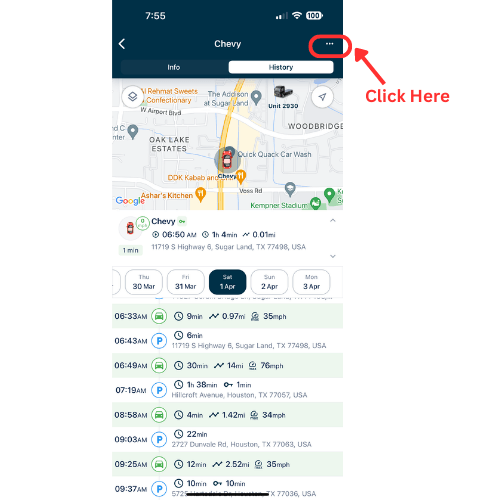
- Click on the 3 horizontal dots on the upper right hand corner of your screen. (see image below)
- Click on 'Send Command'
- Click on 'Enable Killswitch'
- Wait 7-10 seconds and your ingition will not start
- To disable kill switch and allow your ignition to start, click on 'Disable Killswitch'
https://www.youtube.com/shorts/HHlxE-rlq7c